LiveTrack3.25
Publisher Description

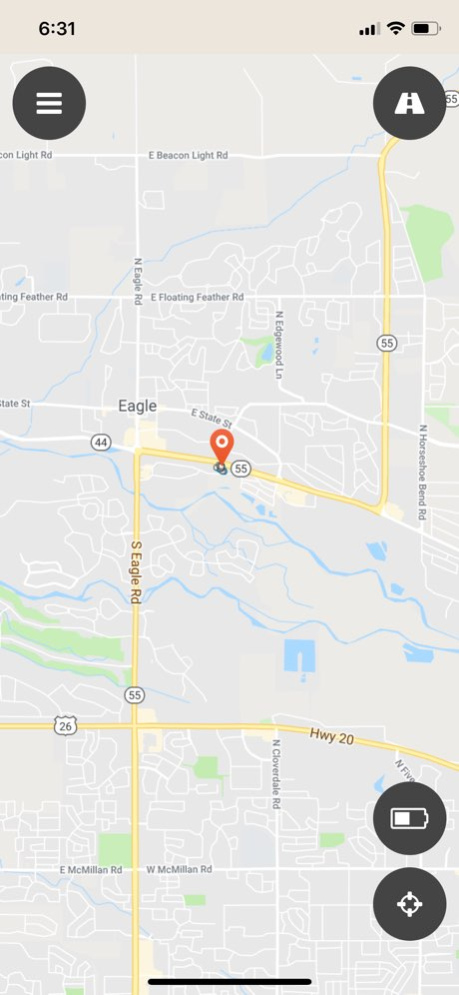


The Datablaze LiveTrack mobile app allows you to track any Datablaze device live from your Apple device. View multiple preset history ranges, or select a date range of GPS history. Shows speed, max speed, trip duration in miles and time.
Don't have a Datablaze GPS Tracker? Get one here: http://www.datablaze.com
Version History - Fix an issue with the date range picker on the map 3.25 10/22/2021 - Fixed a bug that was preventing zones from saving for some users
- Improved map panning on zones
- Added support for additional device models 3.24 10/06/2021 - Fixed a bug that was preventing notifications from being displayed for some users 3.23 10/24/2019 - Added accurate descriptions for newer models during activation
- Fixed a bug that prevented some devices from scanning activation barcodes
- Fixed some appearance issues that were affecting devices with large screens 3.22 10/02/2019 -Enabled new map for TechTrack users
-Assorted bug fixes 3.20 01/30/2019 - Added support for the Datablaze Bolt Mini
- Fixed a bug related to date range selection on the map 3.12 01/05/2019 - Added Get Directions button to the map menu 3.11 12/14/2018 - Upgraded device support to include many more GPS trackers.
- Better iOS compatibility for installation new mobile devices
- Improved account settings and review features
- Stability fixes 3.1 10/17/2018 Added a simple walkthrough and iOS 11 support 2.16 09/22/2017 Added confirmation on device activation 2.14 09/14/2017 Improved barcode scanner 2.13 09/08/2017 - User account stability
- Minor bug fixes 2.12 09/06/2017 - New functionality for the Blackhawk GPS
- find our more at www.blackhawkgps.com
- Minor bug fixes 2.1 09/04/2017 Enhanced security and reliability. 2.0 08/21/2017 Rate app option, increased stability, added menu bar and styling, added option to view multiple devices on map at same time 1.2 03/24/2017 Compatibility and bug fixes, optimize speed.
Added menu bar, trips, show last feature, directions, and more 1.1 03/22/2017 1.0 01/14/2016
About LiveTrack
The company that develops LiveTrack is DATABLAZE, LLC. The latest version released by its developer is 3.25.
To install LiveTrack on your iOS device, just click the green Continue To App button above to start the installation process. The app is listed on our website since 2026-10-07 and was downloaded 3 times. We have already checked if the download link is safe, however for your own protection we recommend that you scan the downloaded app with your antivirus. Your antivirus may detect the LiveTrack as malware if the download link is broken.
How to install LiveTrack on your iOS device:
- Click on the Continue To App button on our website. This will redirect you to the App Store.
- Once the LiveTrack is shown in the iTunes listing of your iOS device, you can start its download and installation. Tap on the GET button to the right of the app to start downloading it.
- If you are not logged-in the iOS appstore app, you'll be prompted for your your Apple ID and/or password.
- After LiveTrack is downloaded, you'll see an INSTALL button to the right. Tap on it to start the actual installation of the iOS app.
- Once installation is finished you can tap on the OPEN button to start it. Its icon will also be added to your device home screen.
Program Details
System requirements
Download information
Pricing
Version History
version 3.25
posted on 2026-10-07
Version History - Fix an issue with the date range picker on the map 3.25 10/22/2021 - Fixed a bug that was preventing zones from saving for some users
- Improved map panning on zones
- Added support for additional device models 3.24 10/06/2021 - Fixed a bug that was preventing notifications from being displayed for some users 3.23 10/24/2019 - Added accurate descriptions for newer models during activation
- Fixed a bug that prevented some devices from scanning activation barcodes
- Fixed some appearance issues that were affecting devices with large screens 3.22 10/02/2019 -Enabled new map for TechTrack users
-Assorted bug fixes 3.20 01/30/2019 - Added support for the Datablaze Bolt Mini
- Fixed a bug related to date range selection on the map 3.12 01/05/2019 - Added Get Directions button to the map menu 3.11 12/14/2018 - Upgraded device support to include many more GPS trackers.
- Better iOS compatibility for installation new mobile devices
- Improved account settings and review features
- Stability fixes 3.1 10/17/2018 Added a simple walkthrough and iOS 11 support 2.16 09/22/2017 Added confirmation on device activation 2.14 09/14/2017 Improved barcode scanner 2.13 09/08/2017 - User account stability
- Minor bug fixes 2.12 09/06/2017 - New functionality for the Blackhawk GPS
- find our more at www.blackhawkgps.com
- Minor bug fixes 2.1 09/04/2017 Enhanced security and reliability. 2.0 08/21/2017 Rate app option, increased stability, added menu bar and styling, added option to view multiple devices on map at same time 1.2 03/24/2017 Compatibility and bug fixes, optimize speed.
Added menu bar, trips, show last feature, directions, and more 1.1 03/22/2017 1.0 01/14/2016
version 3.25
posted on 2021-10-22
Oct 22, 2021
Version 3.25
- Fix an issue with the date range picker on the map
version 3.25
posted on 2021-10-22
- Fix an issue with the date range picker on the map
